How It WorksSupported SportsTeam SharingPricingBlogFAQ

Let Your Players See Every Play Unfold.

Turn every play into a clear animation your players can study, understand, and remember before they step onto the court, field, or rink.


Download on the App StoreGet it on Google Play

The simplest way to create and share playbooks. Free forever on mobile, iPad, and tablet devices. Upgrade only when you want private team sharing inside the SetPlays app.

ONE APP. EVERY SPORT YOU COACH.

🏀 Basketball🏈 Football⚽ Soccer🏒 Hockey🥍 Lacrosse🏑 Field Hockey
From idea to execution

Animate your plays with ease

Create animated sports playbooks on authentic courts, fields, and rinks designed for the sport you coach. Record every movement frame by frame for both offense and defense, and use the 3-color draw tool to map out passes, screens, and defensive coverages so your players will actually remember their assignments.
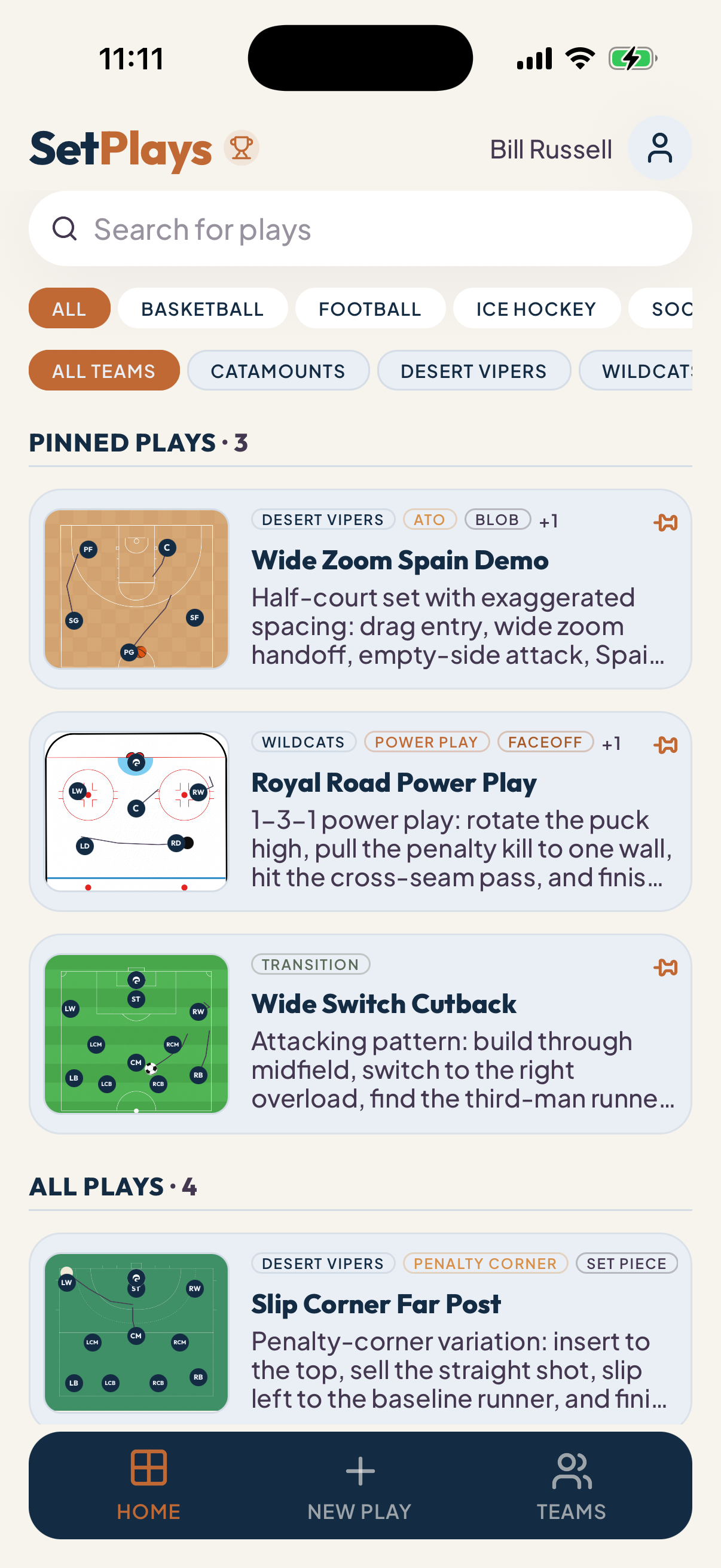
SetPlays basketball animated play creation on iPad and iPhone
1

Pick your sport and surface

Start on a realistic playing surface built for the sport you coach. Place players into formation and build out your strategy.

2

Draw with 3 Distinct Colors

Use the drawing tool with 3 distinct colors to visually separate offensive cuts, defensive slides, and ball motion. Works beautifully with a finger or Apple Pencil/stylus on iPads and tablets.

3

Animate Offense & Defense

Record routes, cuts, screens, passes, and defensive reactions frame by frame. Animate both offensive and defensive players to build 2-way playbooks your players actually remember.

4

Share Your Way

Share a web link with anyone for free, or deliver plays directly to your team inside the SetPlays app.

Multi-Sport Support

Designed for authentic courts, fields, and rinks - full and half

Whether you manage a single squad or an entire athletic department, SetPlays adapts to every sport on your schedule. Each playing surface is mapped to exact tactical specifications so your playbooks always feel familiar, accurate, and ready for practice.

Rosters & Playbooks

Your playbooks, synced straight to your team

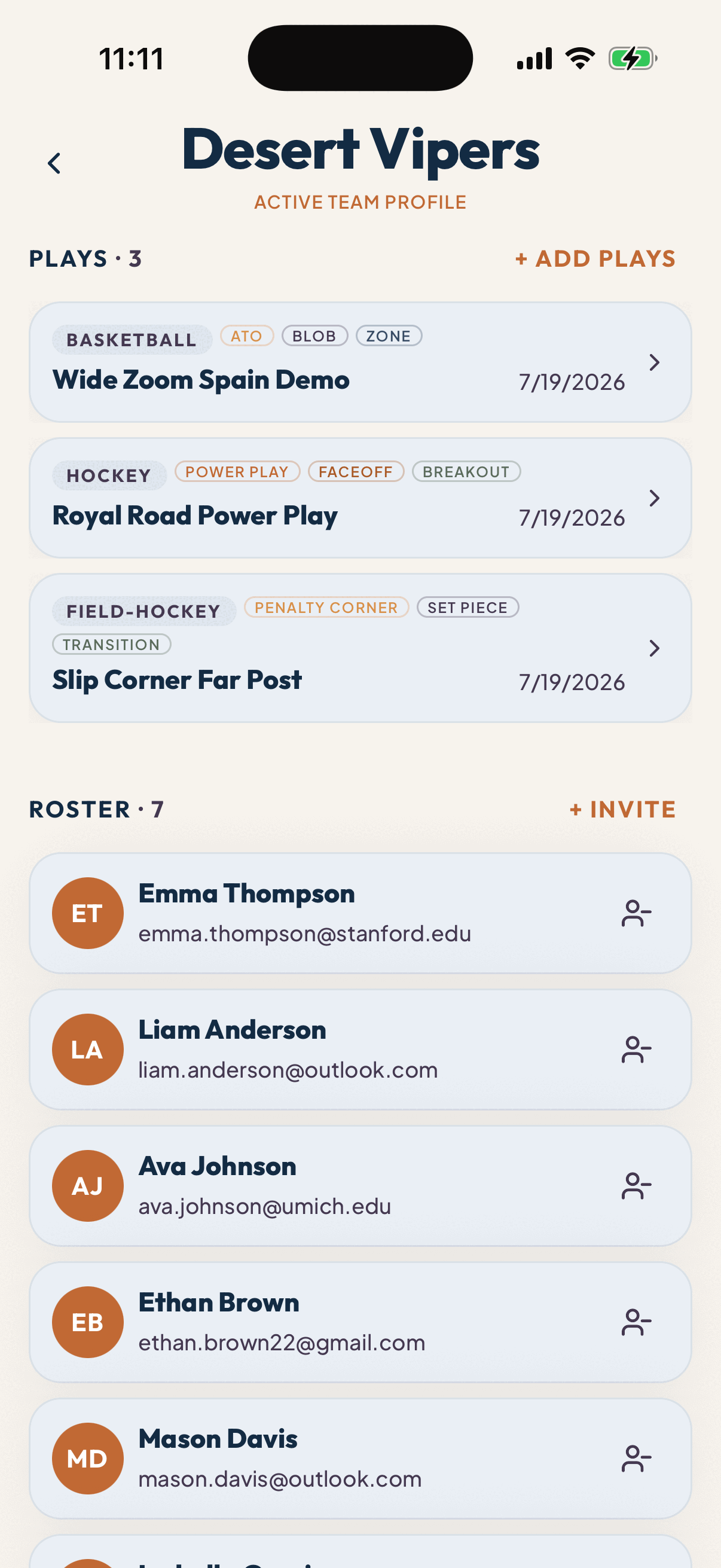
Keep your entire squad connected under one account. Invite your players once, and every time you update a strategy, it syncs to their devices instantly. Draw playbooks on your phone, iPad, or tablet, and watch them sync immediately to your players' devices. Switch between rosters and seasons seamlessly while ensuring your team always has the exact same game plan.
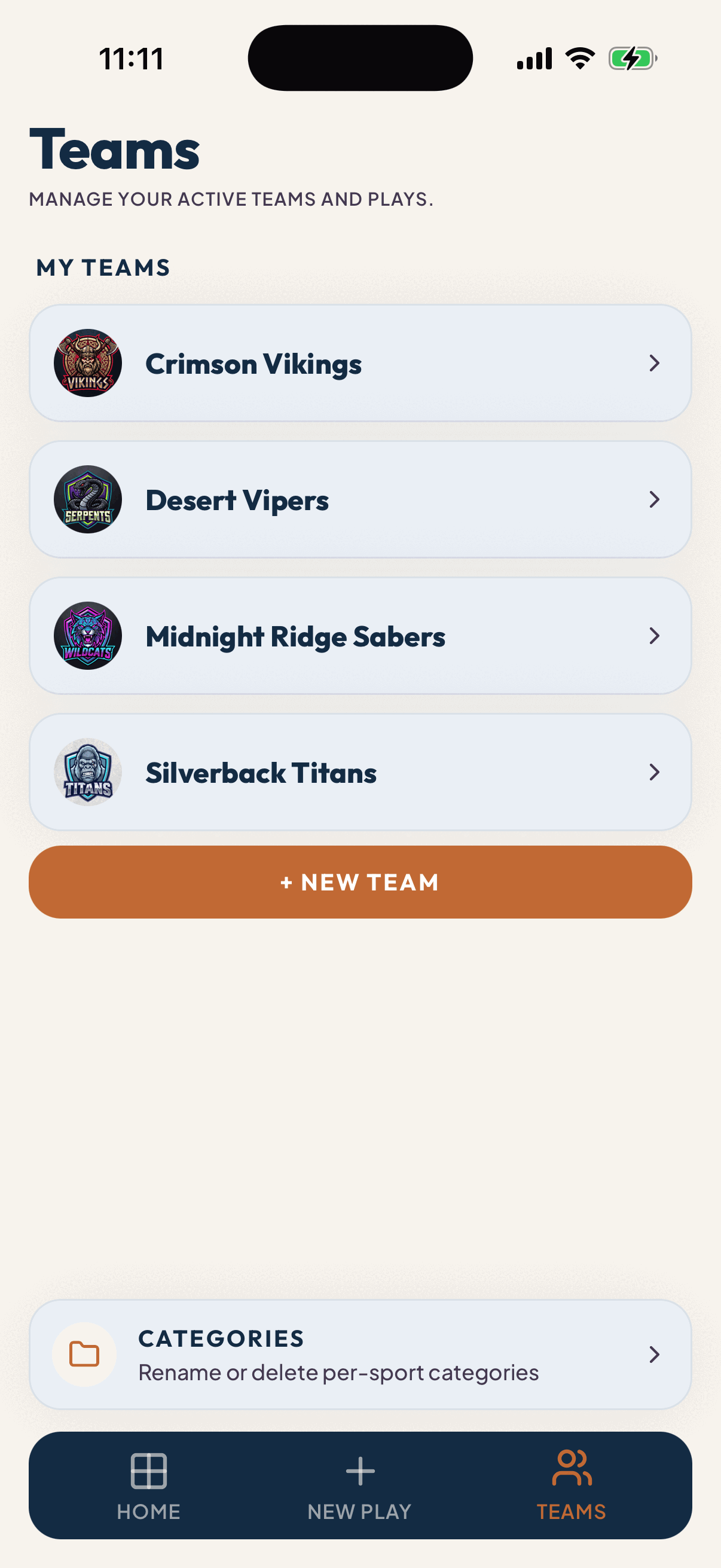
SetPlays multi-team sports playbook management interface for coaches
SetPlays team roster and play assignment screen on mobile
Pricing

Select Your Plan

Upgrade your playbook to keep your entire roster aligned with real-time strategic updates.

MonthlyYearly
FREE

CREATE & SHARE

$0
 

No subscription required


Build unlimited animated playbooks and share them with anyone using a web link.

  • Unlimited plays
  • Access to every supported sport
  • Animated playback
  • Browser sharing
  • Offline viewing and drafts

Download SetPlays to get started

Create plays for free. Upgrade to Teams when you're ready to deliver every play directly in the app. Players always use the app for free.

Download on the App StoreGet it on Google Play
Everything You Need to Know

Frequently asked questions

Features & Playbooks

What sports can I create playbooks for with SetPlays?
SetPlays supports basketball, football, soccer, ice hockey, field hockey, men's lacrosse, and women's lacrosse. Every sport includes authentic playing surfaces, player positions, and coaching tools designed specifically for that game, so you can build animated playbooks that feel familiar from the first play.
Can I create animated sports playbooks?
Yes. SetPlays is the simplest way to build animated playbooks frame-by-frame so players can watch movements exactly as they unfold during the play. Routes, cuts, screens, passes, rotations, and defensive assignments become much easier to understand so players actually remember them on game day.
Can I add and animate defensive players in SetPlays?
Yes. SetPlays supports full 2-way animated playbooks. You can place defensive players on the court, field, or rink and animate their slides, hedges, and help rotations frame-by-frame alongside your offense. Combined with 3 distinct markup colors, you can clearly separate offensive cuts, defensive slides, and passing lanes.
Can I use SetPlays as a digital coaching whiteboard?
Yes. SetPlays works as a digital coaching whiteboard that you can carry in your pocket. Draw plays, animate movements, adjust assignments, and explain strategy visually from your phone or tablet instead of repeatedly sketching the same diagrams on a physical whiteboard.
Can I replace paper playbooks?
Yes. Instead of printing diagrams or carrying heavy binders, you can build your entire digital playbook in one place. Players can review animated plays whenever they need them, reducing confusion and helping your players actually remember their playbook before practice begins.
How does SetPlays compare to Hudl, FastDraw, or paper playbooks?
SetPlays is purpose-built for lightweight, frame-by-frame animated play creation and instant team sharing on iPad, iPhone, and Android. Unlike complex video analysis tools such as Hudl (which focus on game film review) or static drawing apps like FastDraw and paper binders (which rely on static arrows and printed sheets), SetPlays lets coaches sketch animated motion in seconds and share plays for free via browser links or in-app team sync. Read our full competitor comparison →
Is SetPlays a Hudl replacement?
SetPlays is built for creating and sharing animated playbooks, tactical diagrams, and player assignments. Video analysis platforms such as Hudl focus on game film and performance review. Many coaches use SetPlays alongside their existing video workflow to teach concepts before stepping onto the field or court.
Does SetPlays work offline?
Yes. You can create and edit plays without an internet connection. Whether you're on a bus, at a tournament, or standing on the sideline, your playbook stays available. Any cloud synchronization happens automatically once you're back online.

Managing Teams & Players

Can I manage multiple teams?
Yes. The Teams plan allows you to organize unlimited teams under a single account. Whether you coach varsity, junior varsity, club, travel, AAU, or recreational teams, you can keep every roster and playbook organized separately while managing everything from one place.
Can I manage multiple sports with one account?
Absolutely. One SetPlays account supports every available sport. Build basketball playbooks, football route concepts, soccer tactics, hockey breakouts, and lacrosse diagrams without purchasing separate apps or subscriptions.
Do my players need the SetPlays app?
Players do not need the app if you're sharing plays with public browser links. For Teams, players simply download the free SetPlays app and join your team to automatically receive every play you assign.
Can youth teams use SetPlays?
Absolutely. SetPlays is designed for coaches at every level, including youth leagues, recreational programs, travel teams, AAU clubs, high schools, colleges, and competitive organizations. Whether you're coaching your first season or managing multiple programs, SetPlays keeps your playbooks organized and easy to share.

Device Compatibility

What devices does SetPlays support?
SetPlays is available for iPhone, iPad, Android phones, and Android tablets, with browser-based play viewing available through public share links. Team members can access assigned plays directly inside the app on their mobile or tablet devices, while anyone with a browser link can watch plays on any device (including desktop and laptop computers) without installing the app.
Does SetPlays work on iPads and tablets?
Yes. SetPlays is fully optimized for iPads, iPadOS, and Android tablets. The larger screen makes it the perfect digital whiteboard replacement for drawing complex plays with your finger or an Apple Pencil / stylus during team meetings or sideline huddles.
Can players view plays on their phones or tablets?
Yes. SetPlays is designed for mobile and tablet viewing. Players can watch animated plays directly inside the SetPlays app or through a browser link, making it easy to review assignments on their phones, iPads, or tablets before practice, before games, or while traveling.

Plans & Pricing

Is SetPlays really free?
Yes. The Free plan lets you create unlimited animated playbooks, organize plays across every supported sport, and share them with anyone using a browser link. There are no subscriptions, no feature trials, and no time limits. Upgrade only when you want to securely share plays with your team inside the SetPlays app.
What is the difference between the Free plan and the Teams plan?
The Free plan is perfect for creating plays and sharing them using browser links that you can text, email, or post anywhere. The Teams plan lets you create a play once, assign it to your team, and every player automatically receives it inside the SetPlays app. No sending links. No screenshots. No wondering who received the latest version.
Do my players need to pay?
No. Only the coach purchases the Teams subscription. Players simply download the SetPlays app, join your team, and receive every assigned play for free.
How much does the Teams plan cost?
The Teams plan is $9.99 per month or $99.99 per year. One subscription covers your teams, players, and every supported sport, making it easy to deliver every play directly to your team inside the SetPlays app.
Can I share plays without a Teams subscription?
Yes. Every play can generate a public browser link that works on virtually any device. Simply copy the link and send it by text message, email, WhatsApp, or any messaging app. Players can immediately watch the animated play without creating an account.

Give Your Players a Better Way to Learn the Playbook

Download SetPlays for free and start building animated playbooks with ease. Share plays with anyone using a web link, then upgrade whenever you're ready to deliver every play directly to your team inside the app.

Free to download. No subscription required.

Download on the App StoreGet it on Google Play